
The Bit1 Exchange & Endotech Sync: A Step-by-Step Guide to Asset Autonomy
Bit1 and Endotech join forces.
How to natively deploy Dr. Anna Becker’s $40M Neural AI modules in 2026 without API keys or giving up custody of your crypto.
The landscape of algorithmic crypto trading in 2026 has been entirely redefined by one concept: Asset Autonomy.
For years, retail investors had to choose between two unacceptable risks: lock their capital into opaque, smart-contract-based “matrices” that inevitably experience fatigue, or hand their exchange API keys over to unverified third-party trading bots.
The new native integration between the Bit1 Centralized Exchange and Dr. Anna Becker’s Endotech Neural AI has solved this dilemma.
We recently published a technical audit of why crypto MLMs fail, contrasting legacy systems with this new architecture. Today, we are providing the definitive, step-by-step technical blueprint for natively synchronizing Endotech’s institutional-grade algorithms directly inside your Bit1 account.
Inside the Architecture
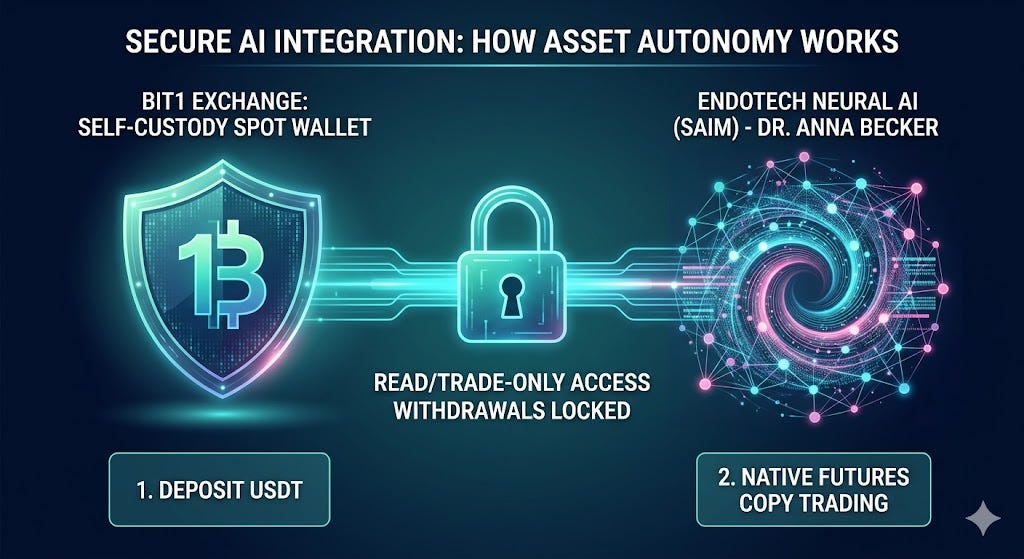
Before you sync, it is crucial to understand the plumbing. We are not “depositing” money into Endotech. We are leveraging a native integration that manages assets that never leave your exchange account.
Because Endotech is natively integrated into the Bit1 infrastructure, there are no API keys to generate, copy, or secure. The synchronization process happens entirely within the Bit1 Copy Trading environment.
You retain 100% custody and final approval over the underlying assets at all times. The AI can execute high-probability entries and exits, but it is mathematically impossible for the algorithm to withdraw or transfer your funds.
The 5-Step Synchronization Blueprint
This process utilizes the authorized Limitless IB Portal to ensure you are tracked for future Fee Diversion and node operating benefits.
Step 1: Create Your Portal Account
Using your partner referral link, register for your Limitless portal account. You will enter your basic information (email, password, country, phone number). Ensure you follow all password security requirements. Once registered, check your email for the verification link and click “Verify Account.”
Step 2: Sync Your Bit1 Exchange Profile
Log back into your new portal account. Scroll down your dashboard until you see the Bit1 Crypto Exchange section. Click “Register,” enter a secure password, and click “Sync Account.” Your portal is now cryptographically linked to the Bit1 infrastructure.
Step 3: Deposit Trading Liquidity (USDT)
Navigate directly to Bit1.com and log in using the same credentials you just created.
Click on Deposit -> Deposit Crypto.Select USDT (Tether) as your currency, as this is required to fund your futures account.Select your preferred network (e.g., Tron/TRC20 for low fees, or Ethereum/ERC20 if transferring from Coinbase).Send your funds to the provided wallet address.
Step 4: Activate & Transfer to Futures
Endotech’s AI leverages the futures market to execute its alpha strategies.
Once your USDT arrives, go to Balance -> Spot.Before transferring, you must Activate your Futures account (follow the quick on-screen prompt).Click Transfer, and move your USDT from your Spot account into your newly activated Futures account.
Step 5: Launch Endotech Copy Trading
This is where the native integration takes over.
In the top navigation bar, go to Futures -> Copy Trading.You will see the official strategies: Endotech BTC Alpha and Endotech Ethereum. Select your preferred strategy and click “Copy Now.”CRITICAL: Ensure you select “Fixed Ratio.” This guarantees your account follows the exact proportional trades of the master AI, allowing for true, automated compounding.Enter your desired allocation amount, agree to the user service terms, and click Start.
Final Thoughts on Institutional Yield
By following this guide, you have not “invested” in a product; you have deployed Web3 wealth infrastructure.
You are utilizing the same $40M AI modules that Dr. Anna Becker’s quant team deploys for institutional clients, but you are doing so while maintaining absolute Asset Autonomy.
This is the defined architecture of 2026. For a deeper analysis of the security protocols and long-term yield projections, view our full Bit1 & Endotech deep dive.
Bit1 Exchange & Endotech API Setup Guide: 2026 Asset Autonomy was originally published in Coinmonks on Medium, where people are continuing the conversation by highlighting and responding to this story.