
Forward Pine Script execution signals to private chats, group chats, and VIP channels with edge-level security and clean HTML cards.
If you trade with TradingView strategies or run a signal community, you’ve probably hit the same wall every algorithmic and discretionary trader runs into sooner or later.
TradingView’s built-in mobile notifications are easy to miss during high-volatility sessions. Setting up your own relay means renting a VPS, writing a Flask or FastAPI listener, configuring Nginx and SSL certificates, handling Telegram rate limits, and praying your server doesn’t crash mid-CPI print. On the other hand, generic no-code tools like Zapier charge steep monthly fees just to forward JSON payloads with noticeable lag.
You shouldn’t need DevOps skills just to get a {{ticker}} alert into Telegram.
In this guide, we’ll set up a zero-VPS TradingView-to-Telegram webhook gateway using BitCLI — a high-frequency market engine that delivers webhooks in under 15 milliseconds.
Why Latency and Architecture Matter
Most webhook bots are simple single-threaded scripts: every incoming HTTP request hits the application layer, queries a slow database, parses text, and blocks while waiting for Telegram’s API. When Bitcoin drops 4% in two minutes and 500 traders trigger alerts simultaneously, those relays choke or time out — and TradingView silently drops failed webhook deliveries.
BitCLI separates edge authentication, payload rendering, and egress delivery into an asynchronous pipeline:
TradingView Alert (POST)
│
▼
Cloudflare Edge + Nginx / Lua ──► O(1) Redis Token & IP Check (Drops spam at the edge)
│
▼
Inbound Receiver ──► Redis Streams (2–3ms internal queuing)
│
▼
Jinja2 Template Worker ──► HTML Sanitizer & Auto-Healer
│
▼
Dedicated Telegram / Discord Egress Workers
Here is what this means in practice:
Sub-15ms relay: Validation happens in memory at the Nginx/Lua edge before touching Python.Zero dropped alerts: Incoming payloads (up to 1 MB) are immediately persisted into Redis Streams and acknowledged with HTTP 200 so TradingView never retries or disables your alert.Self-healing HTML: A missing </b> tag in a Pine Script string normally breaks Telegram’s parser and loses the signal. BitCLI automatically repairs malformed HTML tags before dispatch.
Step-by-Step Setup (Under 2 Minutes)
Step 1: Generate Your Personal Webhook URL
Open @get_tv_webhook_bot in Telegram and tap Start.Send the /webhooks command.Tap ➕ Create Webhook and give it a descriptive tag (e.g., BTC 5m Scalp or VIP Signals).
Step 2: Choose Where Signals Should Go
Select your target destination:
Private Chat: Receive signals directly in your DM with the bot.Channels or Groups (Auto-Discovery): Want alerts in a VIP channel or trading group? Simply add @get_tv_webhook_bot to your channel or group as an Administrator with Post Messages permission. The bot detects the chat automatically and displays it as a button — no need to hunt down numeric -100… chat IDs.
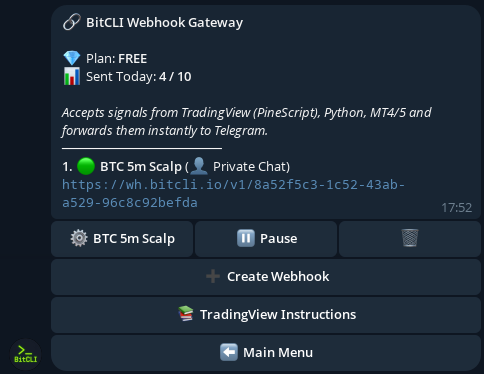
Once selected, the bot generates your unique endpoint:
https://wh.bitcli.io/v1/your-secret-uuid
The /webhooks dashboard in Telegram showing your active webhook URL and status controls
Formatting Signals: 3 Ways to Send Alerts
In TradingView, press Alt + A (or click Create Alert), open the Notifications tab, check Webhook URL, and paste your BitCLI link.
Next, go to the Settings tab and configure the Message box using one of three formats:
Option 1: Zero-Config Structured Card (Recommended)
If you want clean, readable trade cards without writing HTML, pass a standard JSON object using TradingView placeholders:
{
“coin”: “{{ticker}}”,
“action”: “BUY”,
“price”: {{close}},
“leverage”: 10,
“comment”: “15m RSI Bounce”
}
BitCLI automatically parses these fields and formats them into a clean Telegram card:
Option 2: Custom Jinja2 + HTML Templates
Running a custom Pine Script strategy with Take Profit, Stop Loss, or plot values? Pass a “message” key in your JSON payload. BitCLI evaluates Jinja2 variables and renders Telegram HTML (<b>, <i>, <code>, <pre>):
{
“message”: “🔥 <b>PINE SCRIPT ALERT</b>nCoin: <code>{{ticker}}</code>nSide: <b>LONG</b>nEntry: <code>{{close}}</code>nTP: <code>{{plot_0}}</code>nSL: <code>{{plot_1}}</code>nn<i>Relayed via BitCLI Gateway</i>”,
“ticker”: “{{ticker}}”,
“close”: {{close}}
}
Option 3: Plain Text
Need something fast for debugging? Just write plain text (e.g., Break of structure on {{ticker}} at {{close}}). BitCLI detects non-JSON payloads automatically and forwards the message as-is.
Built for VIP Channels & Serious Traders
Once your alerts are live, the /webhooks menu gives you operational controls that usually require maintaining your own backend:
One-Tap Pause / Resume: Market ranging or performing strategy maintenance? Pause any webhook directly inside Telegram without touching or recreating dozens of active alerts on TradingView.Instant URL Rotation: Accidentally exposed your webhook URL in a screenshot or livestream? Generate a fresh UUID in one tap while keeping your tag and destination intact.TradingView IP Whitelist: Toggle the TV IP filter to reject requests that don’t originate from TradingView’s official servers.Your Own White-Label Bot (/my_bot): Telegram enforces a global rate limit of 30 messages per second per bot token. If you run a high-frequency setup or a branded VIP signal channel, run /my_bot and paste a token from @BotFather. BitCLI links your personal bot in one second — giving you an isolated delivery queue, your own branding, and zero shared bottlenecks.Discord & Autonomous Agents: Looking to route alerts beyond Telegram? Through the unified hub at my.bitcli.io, BitCLI also supports formatted Discord Webhook embeds and WebSocket event streams for Python bots and AI agents.
Transparent Quotas & Pricing
You don’t need a credit card to get started. The Free tier is designed to let you test strategies in live market conditions before scaling:
Free ($0/mo): 1 webhook slot • 10 signals/dayTrader ($1/mo or $10/yr): 5 webhook slots • 100 signals/dayCore ($3/mo or $30/yr): 20 webhook slots • 500 signals/dayPro ($10/mo or $100/yr): 100 webhook slots • 3,000 signals/dayPrime ($30/mo): 100 webhook slots • Unlimited daily signals
(All paid plans also unlock higher capacities for BitCLI’s built-in C++ price/order-flow alerts, wildcard market scanners, and risk calculators.)
Start Forwarding Alerts in 60 Seconds
Ready to retire your VPS and messy webhook scripts?
👉 Launch the Bot: t.me/get_tv_webhook_bot
🛠 Pine Script Templates: github.com/BitCLI-io/bitcli-tv-webhooks
📖 Full Webhook Docs: docs.bitcli.io/webhooks
🌐 Main Platform: bitcli.io
How to Relay TradingView Alerts to Telegram in 15ms (No VPS, No Coding) was originally published in Coinmonks on Medium, where people are continuing the conversation by highlighting and responding to this story.